
Bleap
Shanghai Bulipu Technology Limited CompanyMusic
3.815.00 Reviews
- Version
- 1.0.0
- Installs
- 10.00K
- Age Rating
- Everyone
Screenshots




Our Review of Bleap
 Analysis by Appyee
Hey there, app enthusiasts! Let me take you on a little journey through the world of Bleap, a nifty app that’s been causing quite the buzz among users lately. I’ve had a chance to dive into it, explore its features, and see what all the fuss is about. So, grab a cup of coffee, sit back, and let’s chat about what Bleap has to offer!
First Impressions Matter
So, the first thing I noticed about Bleap is its sleek and modern interface. It’s got that minimalist vibe that’s super easy on the eyes. Navigating through the app is a breeze, which is a big win in my book. You don’t want to be fumbling around just to find basic features, right?
After downloading it from the app store, setting up was straightforward. A few taps and I was ready to explore what it had in store. There’s something about a well-designed app that just makes you feel like the developers really know what they’re doing, you know?
Features That Stand Out
Now, let’s dive into the meat and potatoes of what makes Bleap special. This app is packed with features designed to enhance productivity and streamline everyday tasks. Whether you’re a student, professional, or just someone trying to keep their life organized, there’s something here for you.
Task Management: One of the standout features is its robust task management system. You can easily create to-do lists, set reminders, and track your progress. The interface is intuitive, allowing you to prioritize tasks and even delegate them if you’re working in a team. It’s like having a personal assistant in your pocket!
Integration: Another cool aspect is its ability to integrate with other popular apps. Whether it’s syncing with your calendar, email, or note-taking apps, Bleap makes sure everything is interconnected. This integration is seamless, ensuring that all your tools work harmoniously together.
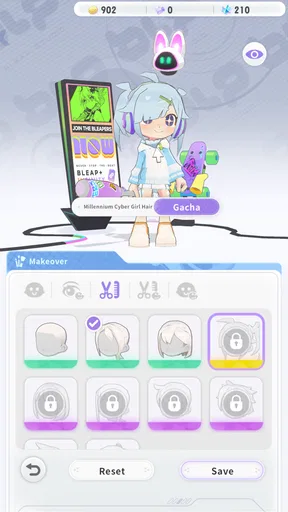
Customization: Personalization is key, and Bleap gets that. You have the freedom to tweak settings to fit your style. From changing themes to customizing notifications, it’s all about making the app work for you.
User Experience
Let’s talk about the overall user experience. One word: smooth. From the moment you open the app, everything feels fluid. There are no annoying lags or crashes, which is crucial when you’re relying on an app to keep your day organized.
The app also offers excellent support. There’s a helpful FAQ section and a responsive customer service team that’s just a message away. It’s always reassuring to know that help is just around the corner if you hit a snag.
Room for Improvement
Now, no app is perfect, and Bleap is no exception. While it excels in many areas, there are a few tweaks I’d love to see in future updates. For starters, expanding the integration options even further would be a game-changer. More compatibility with a wider range of apps would make it even more robust.
Additionally, while the customization options are decent, adding more themes or widgets could enhance personalization even further. I mean, who doesn’t love a good widget?
Final Thoughts
All in all, Bleap is a solid choice for anyone looking to boost productivity and keep their life in check. It’s user-friendly, feature-rich, and just plain fun to use. Whether you’re managing work projects or just trying to remember to buy milk, this app has got your back.
If you haven’t tried it yet, give it a whirl. It might just be the app you didn’t know you needed. Happy organizing, folks!
Verdict
Strengths of Bleap
- Intuitive user interface design.
- Seamless integration with social media.
- Customizable notification settings.
- Lightweight and fast performance.
- Regular updates with new features.
Limitations of Bleap
- Limited offline functionality.
- Occasional minor bugs reported.
- Requires account creation to use.
- In-app purchases can be pricey.
- Lacks detailed tutorial for beginners.
Similar Picks in This Category
View All
Tiles Hop Music & Ball Game
AMANOTES PTE. LTD.4.3

Magic Tiles 3™ - Piano Game
AMANOTES PTE. LTD.4.6

Real Piano
Bilkon3.7

Piano Game: Classic Music Song
Dream Tiles Piano Game Studio4.0

Smash Colors: Music Ball Rush
BADSNOWBALL HONGKONG LIMITED4.2

Piano Music Go-EDM Piano Games
Joy Journey Music Games4.5
Frequently Asked Questions
What is Bleap and what does it offer?
Bleap is a cutting-edge productivity app designed to enhance task management and streamline workflow. It offers features like project tracking, team collaboration, and customizable dashboards. Users can easily integrate Bleap with other tools, ensuring seamless communication and efficient project execution. Ideal for both personal and professional use, it aims to boost productivity and organization.
Is Bleap available for both Android and iOS devices?
Yes, Bleap is available on both Android and iOS platforms. Users can download the app from the Google Play Store or the Apple App Store. This cross-platform availability ensures that users can sync their activities and access their tasks from any device, making it convenient for individuals who use multiple devices.
Does Bleap offer a free version, or is it subscription-based?
Bleap offers a free version with basic features suitable for personal use. However, for more advanced functionalities like team collaboration tools, enhanced security, and priority support, users can opt for a subscription-based model. The premium plans are designed to cater to businesses and professionals who need more robust features.
How secure is my data on Bleap?
Bleap prioritizes user data security through advanced encryption protocols and regular security updates. It ensures that all user data is stored securely and only accessible by authorized users. Additionally, Bleap provides options for two-factor authentication and compliance with data protection regulations, offering peace of mind for users concerned about privacy.
Can Bleap integrate with other productivity tools?
Absolutely, Bleap supports integration with various popular productivity tools like Slack, Google Workspace, and Microsoft Office. This allows users to synchronize their tasks and projects seamlessly across different platforms. The integration capability enhances workflow efficiency and ensures that users can maintain consistency in their productivity ecosystem.
Play our best games!


